What's New
Leaderboards
June 30, 2025
Introducing Leaderboards – Let the Friendly Competition Begin!
We’re thrilled to launch Leaderboards, a powerful new gamification feature designed to boost engagement, drive adoption, and build community through healthy competition.
With customizable metrics and rankings, Leaderboards let you:
- Recognize top performers and celebrate achievements
- Motivate participation through friendly rivalry
- Foster connection with shared goals and visible progress
Ready to rise to the top?
Start climbing the Leaderboard today!
Course Completion Email
June 17, 2025
We have made a minor update to the Course Publish area to include an option to send a course completion email to end users once they have completed a course. This will aid direct access users who do not log into MyCompliance to easily prove to management that they have completed their training. The email template can be fully customized by the admin and is available in 43 languages.

If a certificate was added to the course, this will also be attached to the email as shown below:

This option will be available for Fusion, SCORM and MetaCompliance courses.
Filters on Recurring Phish Victims Report
June 13, 2025
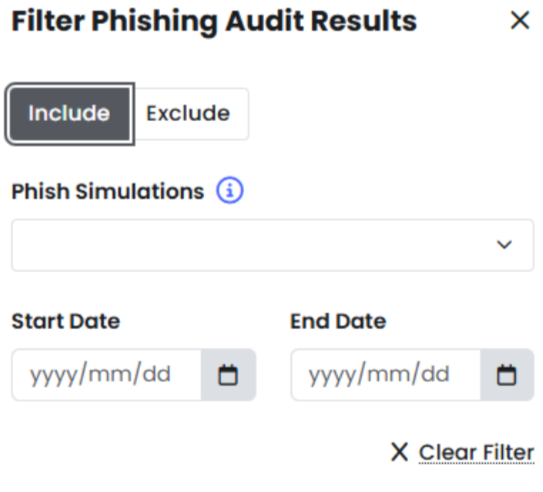
We’re excited to announce new filtering capabilities for the recurring phish victims report, designed to deliver more accurate insights.
What’s New:
Advanced Filtering Controls
- Filter by specific campaigns and/ or date ranges
- Include or exclude test campaigns, outdated simulations, and irrelevant data
- Focus your analysis on the metrics that matter most to your organisation
Customised Data Export
- Export filtered reports with only the data you need
- Maintain consistent formatting across all your exported reports
- Share relevant insights with stakeholders without manual data cleanup
Key Benefits
- More Accurate Analysis: Transform your data from broad overviews into targeted, actionable intelligence
- Time Savings: No more manual filtering or data cleanup
- Stakeholder Ready: Export clean, focused reports for leadership presentations
Getting Started
The new filtering options are available today – Look for the “Filter” button in the top navigation of your recurring phish victims report:

Question Bank
June 10, 2025
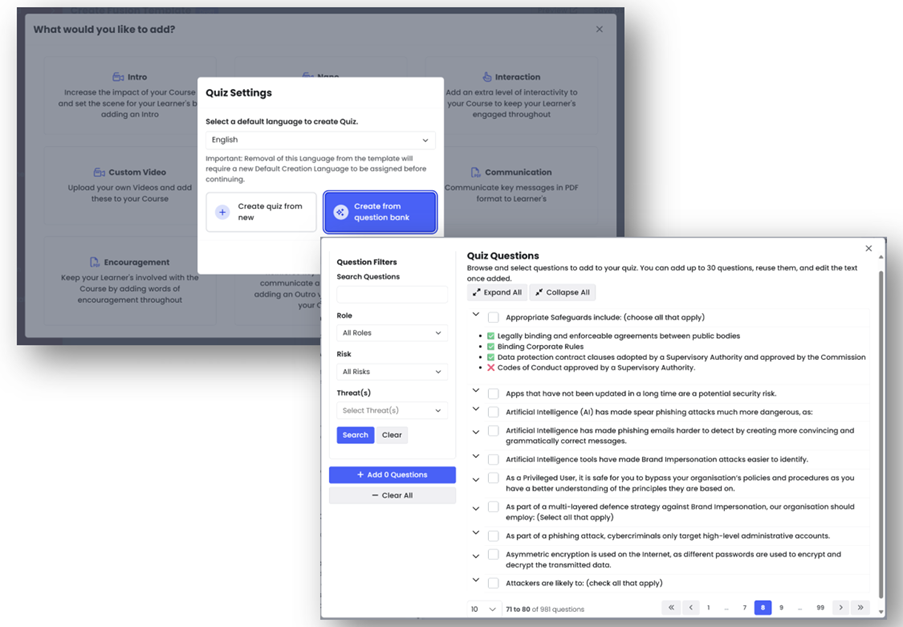
Say hello to faster, smarter quiz creation with the Question Bank — a centralized repository of expertly curated cybersecurity questions. From phishing to password hygiene, build tailored quizzes in minutes using pre-approved, multilingual content designed for global teams.
With smart search, role-based tagging, and full editing flexibility, admins can now deliver relevant, impactful training that aligns with your organization’s unique security goals. View More.
PDF Viewer Update for Phish Learning Experiences
June 6, 2025
We’re improving how PDF Learning Experiences are displayed.
Going forward, we will no longer use iframes. Instead, all PDFs will be shown using Adobe’s PDF Embed API. This change will:
Ensure PDFs display correctly on all browsers and devices
Improve the viewing experience on both desktop and mobile
Apply to both MetaCompliance-created and customer-uploaded PDFs
This update makes it easier to view and interact with your learning content.
Learn more Here
Risk Report Builder
May 30, 2025
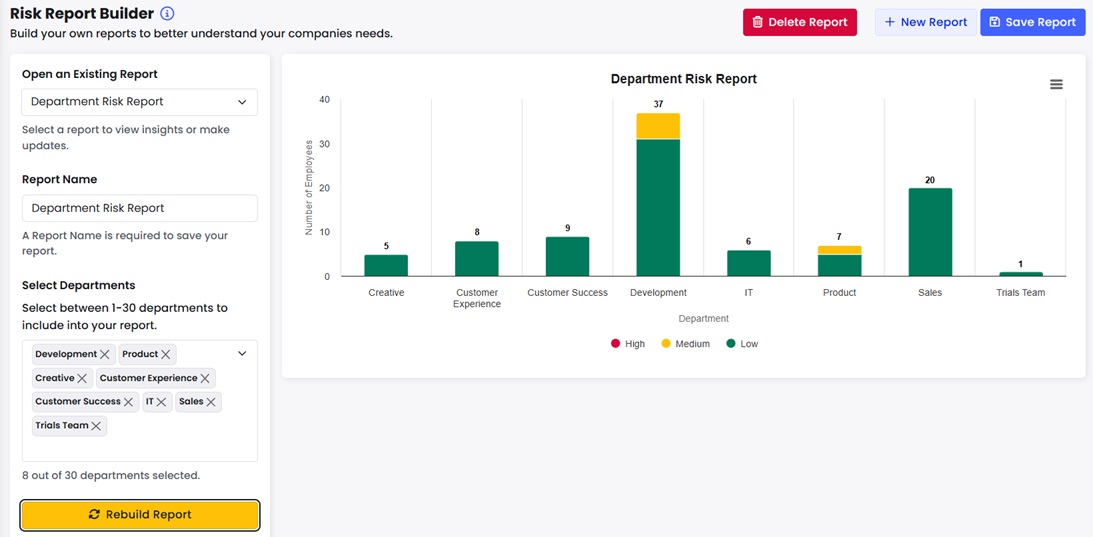
Customers now have the ability to easily create and save custom risk score reports based on departments linked to user accounts. Segment data with department-level filtering, visualise & compare risk levels using interactive bar charts, and drill down for deeper insights. Instantly see how many users fall into low, medium, or high risk categories per department. See here for more information.
Customisable Risk Score Bandings
May 9, 2025
Customers can now tailor risk score bandings to align with your organisation’s security criteria. This feature lets you define which risk scores fall into the low, medium or high risk categories, ensuring more accurate user classification. View more information here.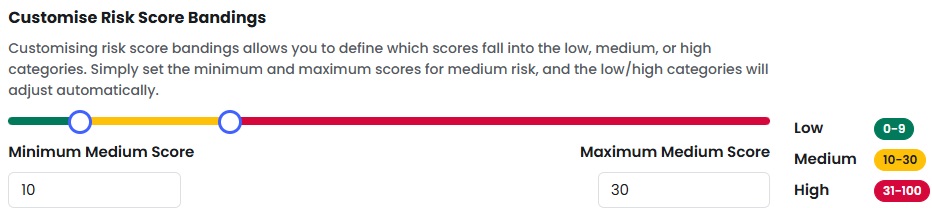
Update to create your own phish & data forms
May 1, 2025
If you choose “Create Your Own Phish” and copy one of our existing templates, the attached data form is now automatically included in the copied HTML. This makes it easy to edit and use the original form, even when customizing the email content—no need to re-add it manually.
You also still have the flexibility to create your own custom form if you prefer.

Comprehensive Phish Interaction Logging
May 1, 2025
We’ve upgraded our phish overview audits to give you full visibility into every user interaction on a phish. Instead of logging only the latest action IP, the system now records every interaction with a unique timestamp and IP address.
What’s new
- Complete Interaction History: No more overwriting—every action is logged and preserved.
- Chronological Timeline: See all user interactions in order, directly from the reports.
- Clear Differentiation: Easily distinguish between opens, clicks, reports, data entries etc.
- Download all IP logs: Download a complete list of interaction IP addresses for in-depth investigation or external analysis as needed.

Why It Matters:
Full visibility into user behaviour across multiple interactions.
Better analysis of false positives and potential vulnerabilities.
Stronger compliance with audit-ready logs.
Industry Comparison Dashboard
May 1, 2025
Admins can now benchmark their company’s employee risk score against industry peers using our new Industry Comparison Dashboard. View your performance with three key charts:
Your Average vs Industry Average
Your Average vs Other Industries
Average Risk Factor Weighting
These insights help identify performance gaps, guide risk strategy, and improve prioritisation. Your scores update daily; industry data refreshes monthly.
Available now under Risk Dashboard > Industry Comparison. View here for more information.

Custom Certificates
April 30, 2025
We’re excited to announce a new feature that allows you to upload your own PDF certificates, assign these to your courses and present these to users upon course completion.
Why This Matters:
- Brand Consistency: Maintain your brand’s identity across all certificates.
- Global Reach: Create a certificate in any language to cater to a diverse audience.
- Personalization: Ensure each certificate is personalized with the user’s details (Placeholders).
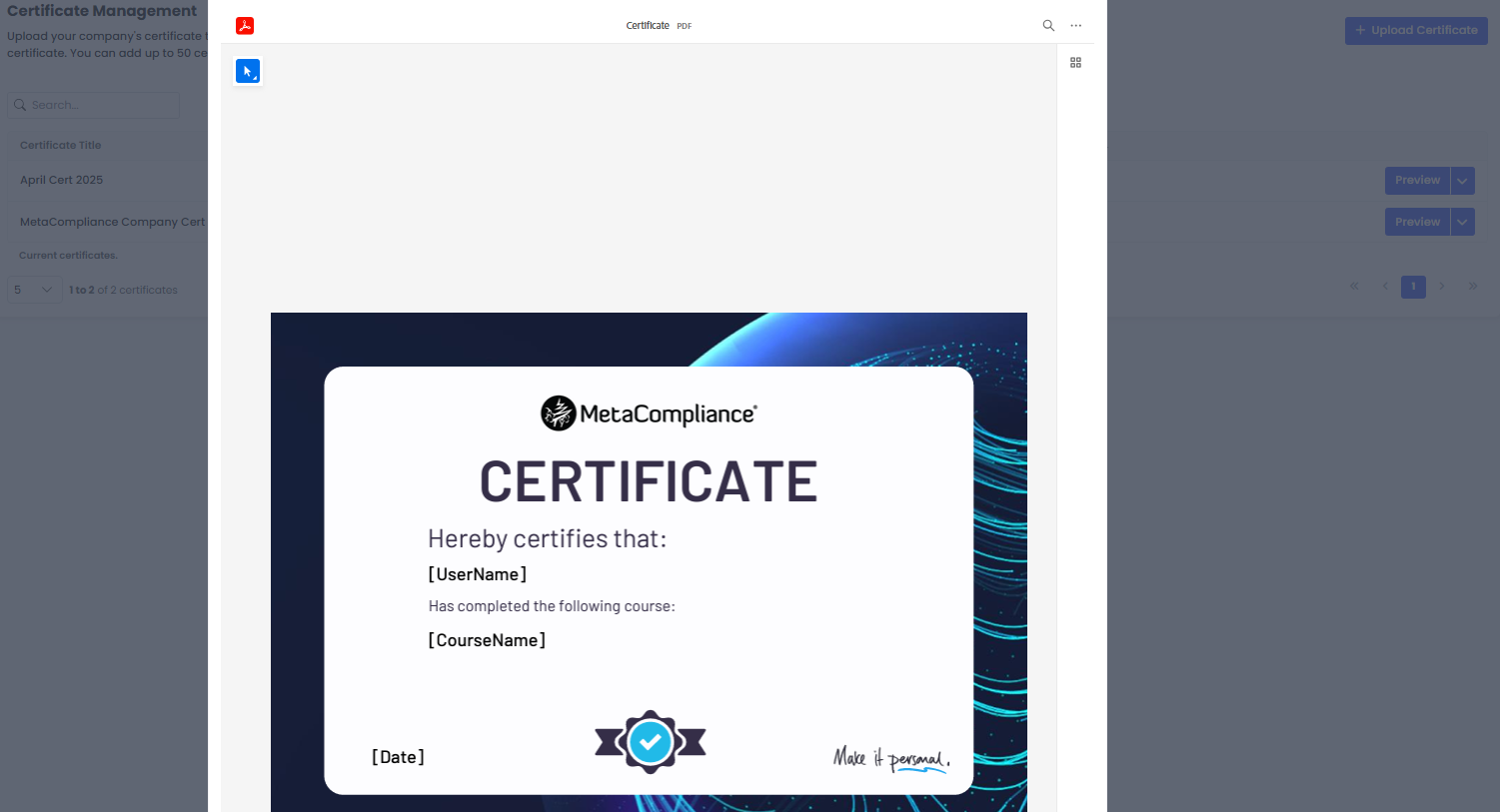
To ensure this functionality works smoothly, please embed the following placeholders as text fields in your certificate design:
- [UserName]
- [CourseName]
- [Date]
Important Reminder: Placeholders are essential for this feature to function correctly. Make sure to include them in your certificate design. More information on this feature and placeholder guidelines can be found here.
Comprehensive Overview Audit Report Fields
April 23, 2025
To make cross-referencing reports easier, we’ve enhanced our overview audits to include key user details – all in one place.
Now, when exporting audits, you’ll have access to these additional fields:
✅ Role
✅ Registered Date
✅ Username
✅ Group Name (shows you all groups a user is in)
✅ Join Date
✅ Category
With this update, you can export all relevant user and audit data from a single location – no more jumping between different reports. More info here
Further to this, an additional column has also been added to the Learning Overview report to indicate if a user completes an available Pre-test – ‘Completed Pre-test’. More info here
The ‘Completed Pre-test’ field can also be output via the Customer API if available.