What's New
Option to Hide Departmental Training Question
August 8, 2024
We have introduced a new feature to ensure that the end user departmental training question and reports can be managed more effectively.

Features & Benefits
- Optional Departmental Training Question: A new enable/disable toggle is available within the Company Edit settings, allowing customers to choose whether to display the Departmental Training question to end users on their homepage and the related reports within the Admin Risk Dashboard.
Risk Factor Insights added to Risk Score Reports
August 8, 2024
Administrators require detailed insights into the factors influencing user risk scores to improve security awareness and manage human risk effectively.
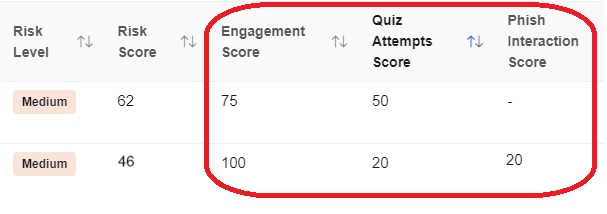
To address this, we have introduced new risk factor insights providing greater visibility into what influences risk scores and which departments they relate to. This includes adding columns for Engagement Score, Quiz Attempts Score, and Phishing Interactions Score along with their Department, Sub Groups and User Status to the following reports:
- Organizational Risk Levels
- Preferred Departmental Training vs Employee Risk
- Preferred Language
Features & Benefits
- Engagement Score: Tracks user engagement, helping identify those who are actively participating or disengaged.
- Quiz Attempts Score: Measures the users average number of quiz attempts within Fusion Courses
- Phishing Interactions Score: Monitors interactions with phishing simulations.
- Department & Group Name: Ability to view user’s Department and Group Names to identify which department the user belongs to.
- User Status Visibility: To help identify is a user is currently active or on long term leave.
Why Use Risk Insights?
- Enhanced Risk Visibility: Gain a clear understanding of what drives risk scores, allowing for more informed decision-making.
- Improved Human Risk Management: Identify specific factors contributing to increased or decreased risk, enabling targeted interventions.
Risk Scores for SCORM Transfer Courses
August 8, 2024
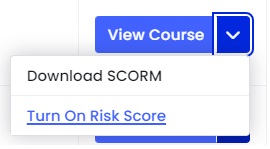
We have introduced an enhancement to include the Engagement and Average Quiz Attempt risk factors in the risk scoring calculation for SCORM transfer courses. This feature will be available during the course creation process and in the Learning in Progress table, under the actions column.
Features & Benefits
- Comprehensive Risk Scoring: Integrate engagement and quiz attempt risk factors with SCORM transfer courses, providing a more complete risk score for your users.
- Customisable Risk Inclusion: Easily add the ‘include in risk score’ option during SCORM course creation and within the Learning in Progress table.
Format Question Guidance in Privacy and Incident Assessments
August 8, 2024
We have introduced our enhanced formatting capability for the privacy and incident assessment guidance modals.
Features & Benefits
- Bullet Points: Organize guidance into easy-to-read bullet points, ensuring clarity and quick comprehension.
- Paragraph Formatting: Structure guidance into coherent paragraphs for improved readability.
- Hyperlinks: Add clickable hyperlinks to guide users to additional resources, websites, or supporting materials like videos.
- Text Styling: Utilize bold and underline features to highlight critical information.
Why Use It
- Improved User Experience: Well-formatted guidance ensures users can quickly grasp and follow instructions and guidelines.
- Enhanced Communication: Clear and concise formatting aids in better communication of important information.
By adopting our enhanced formatting feature, you can improve user engagement and increased understanding of your questions, leading to better responses being provided by end user users. Please see here for more information.
Reissue email notification for courses
July 15, 2024
Admins often face difficulties ensuring that employees complete their cyber security training. One common issue is the inability to resend email notifications to users who cannot find the initial email, leaving them unable to access and complete their training. This results in increased human risk and lower overall security awareness within the organisation.
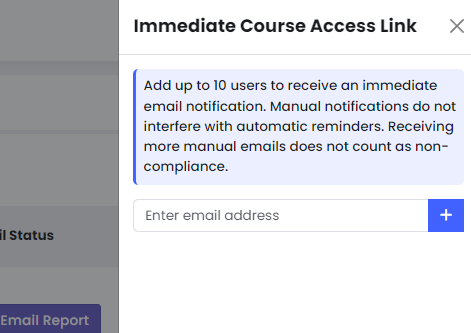
To address this challenge, we have introduced a manual email reissue feature. This feature allows admins to instantly resend email notifications to users directly from the ‘Learning in Progress’ page, ensuring that important training emails are at the top of their inboxes.
- Instant Resend: The ‘Resend Email ‘ button for courses allows admins to quickly resend email notifications to users who cannot find the original email.
- User-Friendly Interface: Admins can easily enter a user’s email and send notifications without interfering with automatic reminders.
- Error Handling: System provides feedback if an email is incorrect, ensuring accurate targeting.
- Enhanced Training Completion: By ensuring users receive their email notifications promptly, the likelihood of completing cyber security training increases, thereby reducing human risk.
For admins, this feature is essential for improving security awareness and managing human risk. By providing a reliable method to ensure all users receive their training notifications, it helps maintain high compliance rates and reduces vulnerabilities associated with incomplete training. This tool is crucial for maintaining a robust security posture and fostering a culture of awareness and vigilance within the organisation. More info here
Adobe PDF API Viewer in Policy and Learning
July 15, 2024
The Adobe PDF API Viewer is now embedded for all policy documents and PDF communications within our Fusion courses.
This solution aims to provide a seamless viewing experience regardless of zoom level, ensuring that all users, including those with accessibility requirements, can easily access and navigate PDF content.
Features & Benefits:
- Enhanced Accessibility and user experience: The Adobe PDF API Viewer supports smooth zooming up to 200%, enhancing readability and usability
- Customisable Viewing Options: Users can minimize menu sections within PDFs, controlling their viewing experience without interruption.
- Integration with Platform and our MyCompliance Teams App: Seamless integration into policies and Fusion courses ensures that PDFs are readily accessible on the MyCompliance Teams App!
This initiative reflects our commitment to leveraging technology to enhance accessibility and streamline user experiences across our platform, reinforcing our dedication to meeting the evolving needs of our users and ensuring compliance with accessibility standards.
Disable Fast Forward and Autoplay for MetaEngage
July 12, 2024
Many end users prefer a seamless viewing experience for video-based courses, ensuring they watch the full content without interruptions. Previously, the settings to autoplay videos and disable fast-forwarding found within the platform Company Edit settings were not available for MetaEngage.
Features and Benefits:
- Autoplay Videos: Videos within Fusion courses will automatically play when accessed via MetaEngage if the autoplay setting is enabled. This ensures a smooth and uninterrupted learning experience.
- Disable Fast-Forward: When enabled, this feature restricts users from skipping through videos in Fusion courses delivered via MetaEngage. This ensures that users watch the entire video content, which can be crucial for compliance and thorough understanding.
By integrating these features into MetaEngage, we enhance the user experience, ensuring consistent application of company-wide video settings. This not only maintains the integrity of the training material but also ensures that users gain the full benefit of the content provided.
Please note: this feature is only available for customers who upgraded to MetaEngage version 2 or above.
Cyber Police: Season Three Campaign Templates
July 1, 2024
We have developed three new campaign templates specifically for Season 3 of Cyber Police: English Only, Core Languages, and Extended Languages. These templates are designed to streamline the process of creating and managing security awareness campaigns.
Features & Benefits
- Ease of Use: Navigate to Campaign Templates to access and utilise these new templates with ease.
- Time-Saving: Set up a comprehensive campaign covering all episodes with just a few clicks, reducing the administrative burden.
- Multilingual Support: Choose from templates tailored to English Only, Core Languages, or Extended Languages, ensuring effective communication across diverse language groups.
- Enhanced Awareness: Deliver consistent and engaging content to end users, significantly improving security awareness across the organisation.
- Improved Risk Management: Cyber Police mitigates risks and reinforces best practices among employees in the most engaging way.
Leveraging these new campaign templates means a significant improvement in the deployment of security awareness initiatives. The ability to quickly and effectively reach all employees with relevant content enhances overall organisational security posture. This leads to better risk management and a more informed workforce, ultimately contributing to the resilience and security of the organisation.
Delivery Status Column
June 27, 2024
Managing and identifying bounced emails within phish audit reports can be challenging for admins. The inability to efficiently sort and filter emails based on their delivery status makes it difficult to quickly identify users with delivery issues, leading to delays in addressing potential problems.
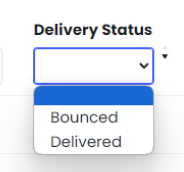
Our latest feature update addresses these challenges by introducing advanced sorting and filtering capabilities in the delivery status column of phish audit reports. This enhancement empowers administrators to efficiently manage and identify bounced emails.
- Sort by Delivery Status:
- Feature: Easily sort the delivery status column to group all bounced emails together.
- Benefit: Quickly identify users on the bounce list, improving visibility and reducing the time needed to manage email delivery issues.
- Filter for Bounced Emails:
- Feature: Filter the delivery status column to view only bounced emails.
- Benefit: Export a filtered list of bounced email users for further investigation by the IT team, ensuring targeted and efficient troubleshooting.
- Flexible Sorting Options:
- Feature: Sort emails by other statuses.
- Benefit: Customise the view based on various delivery statuses, providing comprehensive insights and flexible management of email campaigns.
This feature not only enhances the efficiency of administrative tasks but also strengthens overall security posture by enabling prompt identification and resolution of email delivery issues. With clear visibility into delivery statuses, teams can proactively address potential vulnerabilities, ensuring that simulated phishing campaigns reach all intended recipients.
Storage Limit Notice
June 27, 2024
Organisations are encountering challenges with managing storage limits effectively. Without visibility of storage usage, users often exceed their storage capacity, leading to potential disruptions and the need for support intervention. This lack of visibility into storage usage poses risks to operational efficiency.
To address these concerns, we have introduced a front-end feature that provides information to admins on their storage limit in the Usage Metric report.
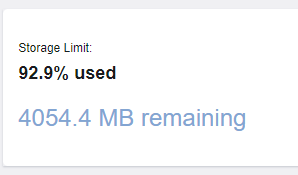
This feature aims to enhance awareness and prevent future incidents by ensuring administrators have real-time visibility into their storage usage.
Features & Benefits:
- Real-Time Usage Metrics: The feature includes a clear indication of current storage usage within the Usage Metric report, empowering administrators to monitor usage trends and plan accordingly.
- Automatic Updates: The storage limit field dynamically updates when new content is uploaded, ensuring administrators have up-to-date information at their fingertips.
- Operational Efficiency: By avoiding overages and potential downtimes, organisations can maintain seamless operations and minimise the need for reactive support interventions.
By implementing visibility of storage usage, organisations can pre-emptively address storage challenges, optimise resource allocation, and uphold data integrity standards.
Enhanced Accessibility 2.0
June 27, 2024
The MetaCompliance Accessibility Project is essential for reducing human risk for our customers and improving overall awareness. Ensuring accessibility not only meets legal requirements but also enhances the security posture by promoting inclusivity and comprehensive user engagement.
This project addresses potential vulnerabilities, ensuring that all users can access critical cybersecurity training and information.
Recent Accessibility Enhancements on Our Platform:
- Enhanced Quiz Experience: We’ve upgraded our quiz checkboxes to Bootstrap 5 (BS5), enhancing accessibility and improving user interaction.
- Improved Pop-Up Accessibility: Our pop-up messages now remain visible until action is taken, stack on top of each other and can be navigated using keyboard controls, ensuring a seamless experience for all users.
- Accessible link in content email notifications: users can now access the link in the email via keyboard only on OWA (outlook web app).
- Alt Tags for Images: We’ve added alt tags to all relevant images, improving accessibility for users relying on screen readers and other assistive technologies.
- Meaningful Links: We’ve updated link text for transcripts to be more meaningful, ensuring users easily understand the action upon clicking.
Update Subject Line on Outlook Web App
June 27, 2024
This feature addresses the problem of customers being unable to review the phish email original subject line when using the “send as attachment” feature within the web application plugin.
By updating the Graph API integration to preserve and display the original subject line of emails sent as attachments, this feature solves the problem by ensuring users can easily view and review the subject line within the web application interface.
Implementing this feature leads to enhanced user experience and improved efficiency in reviewing and managing phishing emails.
By adopting this feature, businesses can achieve more effective phishing detection, driving overall growth and success.