What's New
Amend Publish Dates for Content in a Campaign
June 27, 2024
This feature addresses the problem of inaccurate publish dates for campaign content within reporting, causing confusion and potential misjudgements about user compliance and phish activity.
By changing the publish date of campaign content to the step start date rather than the date the Campaign was published, the platform ensures accurate reporting and avoids misrepresentation of content assignment durations.
Implementing this feature leads to clearer, more accurate reports for admins, reducing confusion and ensuring users are not incorrectly marked as non-compliant. It also provides accurate data in the phish activity report, reflecting the true timing of campaign steps.
By adopting this feature, businesses can achieve more reliable reporting and enhanced clarity in compliance and phish activity tracking, driving overall growth and success.
Change Publish Date of Content in Fusion to Enable Date
June 27, 2024
This feature addresses the problem of inaccurate content release dates and inefficient content sorting, which complicates admin usability and customer experience.
By displaying the enable date instead of the upload date for nanos and updating the sorting options to ‘Most Recent’ in the Fusion Template Creation builder, the platform now provides accurate release information and prioritises the newest content.
Implementing this feature leads to enhanced alignment between our content release messaging and platform dates, improved visibility of recent content for customers, and more effective content management for admins.
By adopting this feature, businesses can achieve a streamlined content management process and improved customer satisfaction, driving overall growth and success.
Optimised Speed and Fullscreen Settings
June 12, 2024
We have made a minor update when playing a fusion course, if an end user has changed their speed settings or has opted to watch the course in full screen then these settings will carry through to all videos elements within the course. This will provide a better viewing experience for end users with less clicks required to achieve their preferred settings when viewing a course.
‘Reported’ column available in Phish Export All Audits
June 12, 2024
We have made a minor improvement to the export option within Phish – Export All Audits. Previously the ‘Reported’ column was not available within this export. We have now added the column to ensure the report on the platform and the export are aligned.
Employee Risk Scores & Engagement Dashboard
June 3, 2024
We are excited to release a new feature that allows for the generation an employee risk score based of several ‘risk factors’. This feature includes new Admin and End User dashboards that provides an overview of employee risks, preferred departmental training risks along and content engagement levels.
Before turning on risk scores, we would advise reading the following knowledge article.

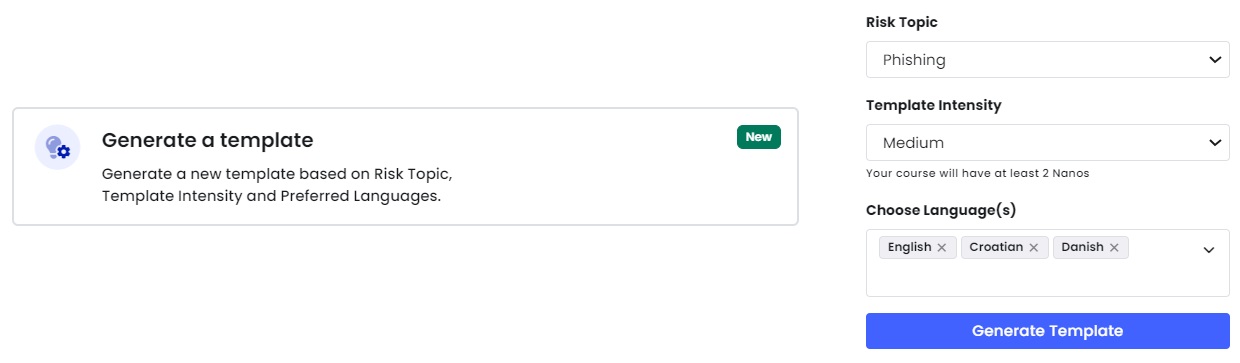
Generate a Fusion Template
June 3, 2024
We are excited to release a new feature to our learning module (for our Premium Plus customers) designed to save time when creating a fusion course template. View more here.
You can now generate recommended courses tailored specifically to your needs using three customisable filters:
Risk Category: Select courses based on 12 cyber awareness risk categories.
Course Intensity: Choose the number of nano videos to be included in the course.
Language Filters: Access training in the language that best suits your organisation.
‘Phish Failures’ column in Recurring Phish Victims Report
June 3, 2024
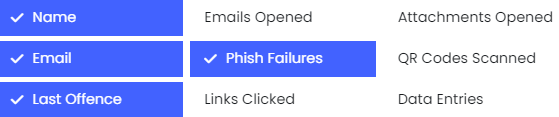
This column provides insights into the number of phishing simulations the end user interacted with. If a phish is interacted with, the ‘Phish Failures’ column will increase count by 1, regardless of how many times the link was clicked. This ensures a clearer understanding of user engagement in this high-level report.
You can now also choose which columns to display and save your preferred view effortlessly. By default, ‘Number of links clicked’ and ‘Number of attachments opened’ will be hidden, ensuring a cleaner report interface.
Setting email reminders per content
June 3, 2024
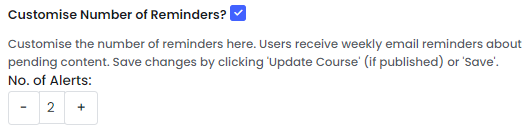
Now, you can tailor the number of reminders for each course, policy, or survey individually, without any impact on other live content. This means you have the flexibility to manage your reminders exactly how you want.
But wait, there’s more! In response to your feedback, we’ve also added the ability for admins to adjust the timing of email reminders. This means you can now schedule your reminders to be sent at the most convenient time for you.
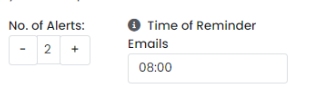
And to make things even better, we’ve updated the default sending time to 8:00 UTC, ensuring that you receive your reminders when they’re most helpful. More information here
Microsoft Defender Integration
June 3, 2024
Now offering integration with Microsoft Defender – aimed at enhancing security insights, streamlining phishing reporting, and improving risk management for users. More information here
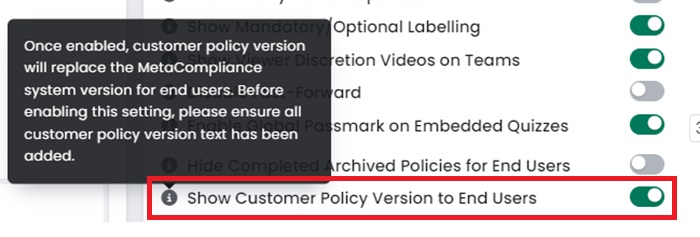
Show Customer Policy Version to End Users
June 3, 2024
We are excited to provide a new feature to our policy module that will allow customers to display their internal policy version to their end users rather than the metacompliance system version. Admins can also view this customer policy version via the Policy Overview Report. View More.
Remove language modal once user confirms preferred language
May 23, 2024
Introducing a seamless language experience for our users! Once users confirm their preferred language, our platform will remember it for future interactions, delivering content in their chosen language without the hassle of repetitive prompts.
Should users decide to switch languages our modal will courteously inquire if their new selection is their preferred language moving forward.

Enjoy uninterrupted learning in the language that suits you best.
Updated Allowed Character List for Privacy Module
May 21, 2024
We have updated the accepted character list for Privacy Registers and Privacy Assessments to allow # characters to be included based on customer feedback.