What's New
Localised Platform Experience from the Start
January 3, 2025
We’ve made it easier for global organisations to deliver a seamless, localised experience. The platform now automatically detects users’ browser language and adjusts the interface accordingly—no manual setup required.
Key Benefits:
- Streamlined Onboarding: Users see their preferred language from the start.
- Time Savings: Eliminates the need for manual language selection.
- Improved Usability: A localised interface enhances navigation and engagement.
This update ensures a smooth, consistent experience for global users, empowering organisations to better serve their international teams.
Risk Score Calculation Time Period
January 3, 2025
The Risk Score Calculation Time Period feature allows administrators to define the period of time considered when calculating user risk scores. This feature ensures that valuable historical user behaviour data (risk factors), previously excluded, can now be factored into employee risk scores. By extending the calculation window, organisations gain more accurate and comprehensive insights into user risk.

Key Benefits
- Gain Deeper Insights: By including historical data (up to 3 years), you can uncover long-term trends and behaviours, providing a clearer understanding of user risk.
- Improve Decision-Making: More accurate risk scores enable you to make better-informed decisions on training, compliance strategies, and risk mitigation.
- Address Unrecognised Risks: Ensure long-term non-compliant users and repeated risky behaviours are no longer overlooked.
MetaEngage Delivery Delay
January 2, 2025
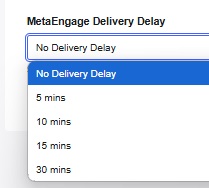
The MetaEngage Delivery Delay feature allows administrators to control when MetaEngage content, such as Policies, Surveys, and Courses, appears on end users’ desktops after login. This helps organisations prevent interruptions during critical tasks, particularly when users first connect in the morning.
Key Benefits
- Prevent interruptions during critical work hours.
- Deliver content at a controlled time after user login.
- Ensure a smoother user experience without compromising engagement.
Google Workspace User Provisioning
December 9, 2024

We have recently released Google Workspace User Provisioning which automates the onboarding and offboarding of users within the MyCompliance platform. This ensures accurate, up-to-date access control without the need for manual intervention.
Features & Benefits:
- Automated user provisioning & deactivation: Seamlessly add, update, or remove users as they join or leave.
- Reduced administrative overhead: Eliminates manual directory updates, freeing up valuable time.
- Real-time synchronisation: Immediate access control updates to minimise unauthorised access risks.
- Single sign-on integration: Secure logins using Google credentials, improving security and user experience.
- Google Groups & Departments: Ability to target Google Groups with content and report on the users assigned departments.
Why Use It?
Google Workspace User Provisioning automates user management, reducing errors and ensuring secure, up-to-date access control within MyCompliance.
Auto-Enrol Users in Published Courses using Triggers
December 6, 2024
We have now enabled admins to set up automated triggers that enrol new users into previously published courses based on specific conditions.
Features
- Dynamic Course Enrollment via Triggers
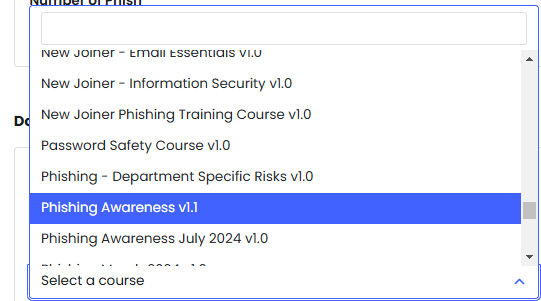
- Admins can configure rules to enroll new users in courses automatically once conditions are met.
- Includes a dropdown that lists published (non-campaign) or new trigger courses, ensuring the content is current and applicable.
Benefits
- Maximised Utilisation of Existing Resources
Ensures previously published courses continue to deliver value by targeting new learners. - Improved Efficiency
Saves time by automating user enrolment, eliminating the need for manual assignments. - Enhanced Learning Coverage
Guarantees that key risk management topics are consistently delivered to all relevant users.
MetaEngage Client Report Update
December 5, 2024
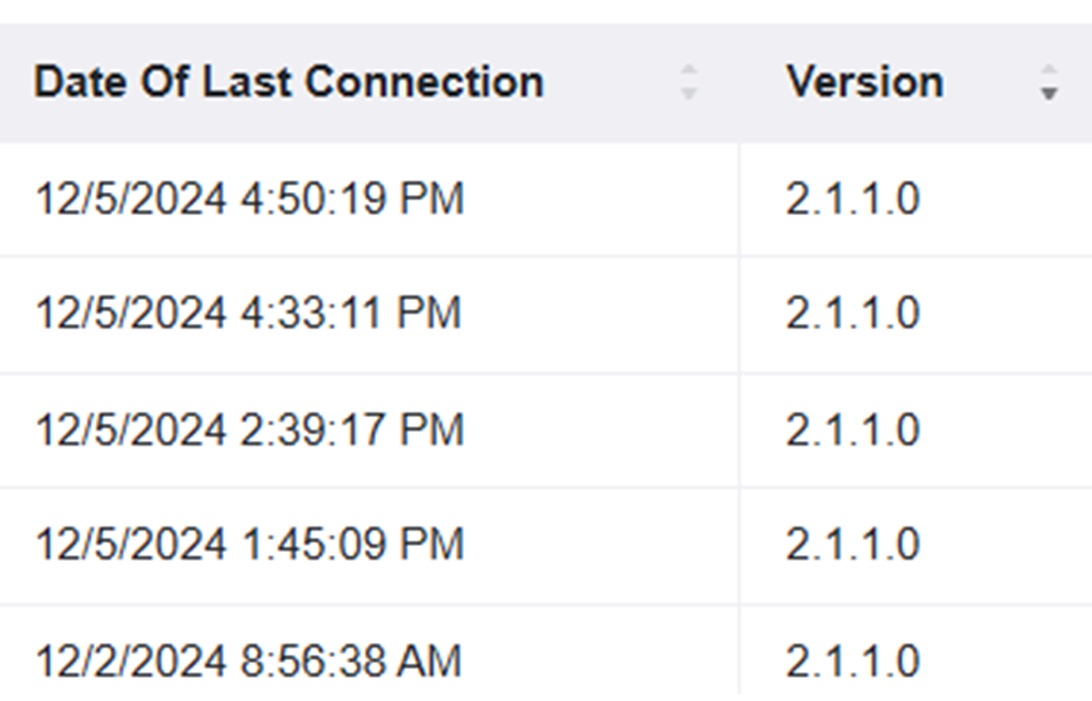
We have introduced a new ‘Date of Last Connection’ column in the MetaEngage Clients Report. This update provides administrators with greater visibility into end users most recent connections with the metaengage client, making it easier to identify why some users have not yet received their content.
Customise Tiles on Homepage and Teams App
November 26, 2024
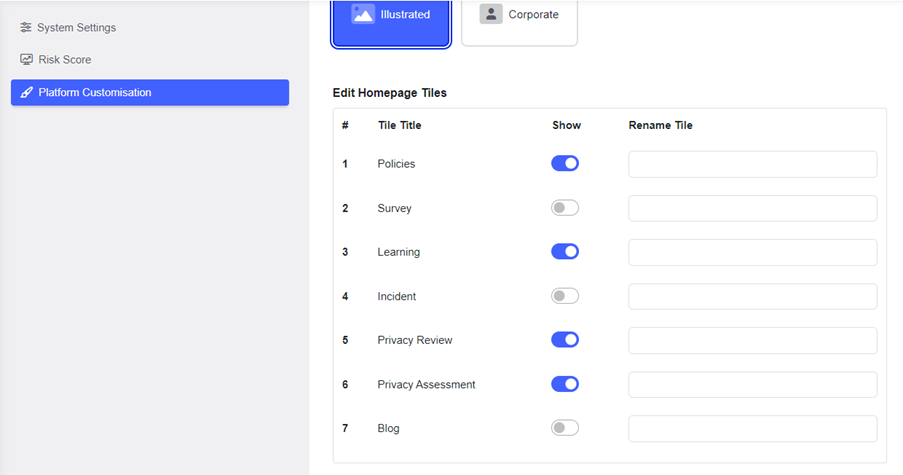
Admins can now customise the tiles displayed on the user homepage and the MyCompliance Teams App. This feature ensures users see only relevant modules, enhancing focus and engagement with key security and compliance tasks.
Features & Benefits:
- Seamless Experience Across Platforms: When modules are hidden on the homepage, they will also be hidden in the MyCompliance Teams App, providing a consistent and clutter-free experience across both platforms.
- Improved User Focus: By removing irrelevant modules, users can focus on the most critical tasks.
Improved Button Accessibility for Policies
November 22, 2024
Buttons on policies will now be grouped into a drop-up menu when they exceed the available screen width. Users can effortlessly view and access all the options in a compact, user-friendly manner, regardless of the number of buttons.

With this enhancement, we address a usability gap, ensuring our PDF viewer meets expectations for accessibility and functionality.
Long Term Leave User Status
November 21, 2024
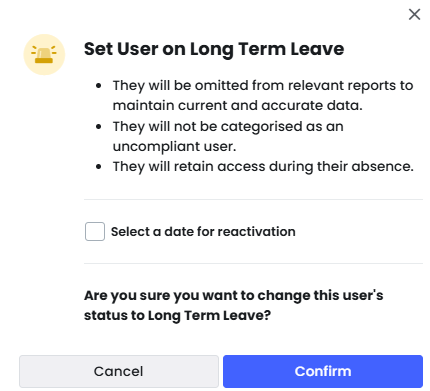
Introducing an automated timing setting for long-term leave user statuses. Admins will now have the ability to set specific durations for long-term leave, ensuring that user statuses are automatically updated when the leave period ends. The system also provides the flexibility to keep users on indefinite long-term leave, with manual reactivation only when needed.
Features & Benefits:
- Automated Status Update: Admins can set a reactivation date for users on long-term leave, allowing the system to automatically update their status after the specified period, eliminating the need for manual follow-up.
- Flexible Leave Duration: Admins have the option to either set a specific leave period or keep the user in ‘long-term leave’ indefinitely, providing flexibility for different types of leave scenarios.
MyCompliance Teams App – Notifications in User’s Preferred Language
November 8, 2024
Localising the user interface & notifications of our MyCompliance Teams App ensures employees worldwide can clearly understand and engage with compliance tasks, reducing errors, boosting completion rates, and improving security awareness across the organisation.
Reorder Sections – Fusion Course
November 8, 2024
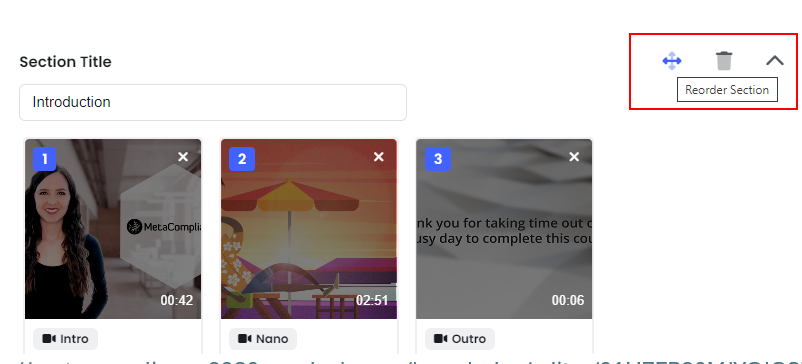
Admins can now rearrange entire sections simply by dragging and dropping during the template creation phase. This eliminates the need to rebuild sections from scratch, saving valuable time and reducing admin workload.
Benefits:
- Streamlined Organisation: Quickly reorder sections without the hassle of recreating content.
- Time-Saving Efficiency: Focus on enhancing course quality rather than managing content structure.
This update simplifies course deployment, helping you build and launch courses more efficiently.
Risk Score Insights
November 7, 2024
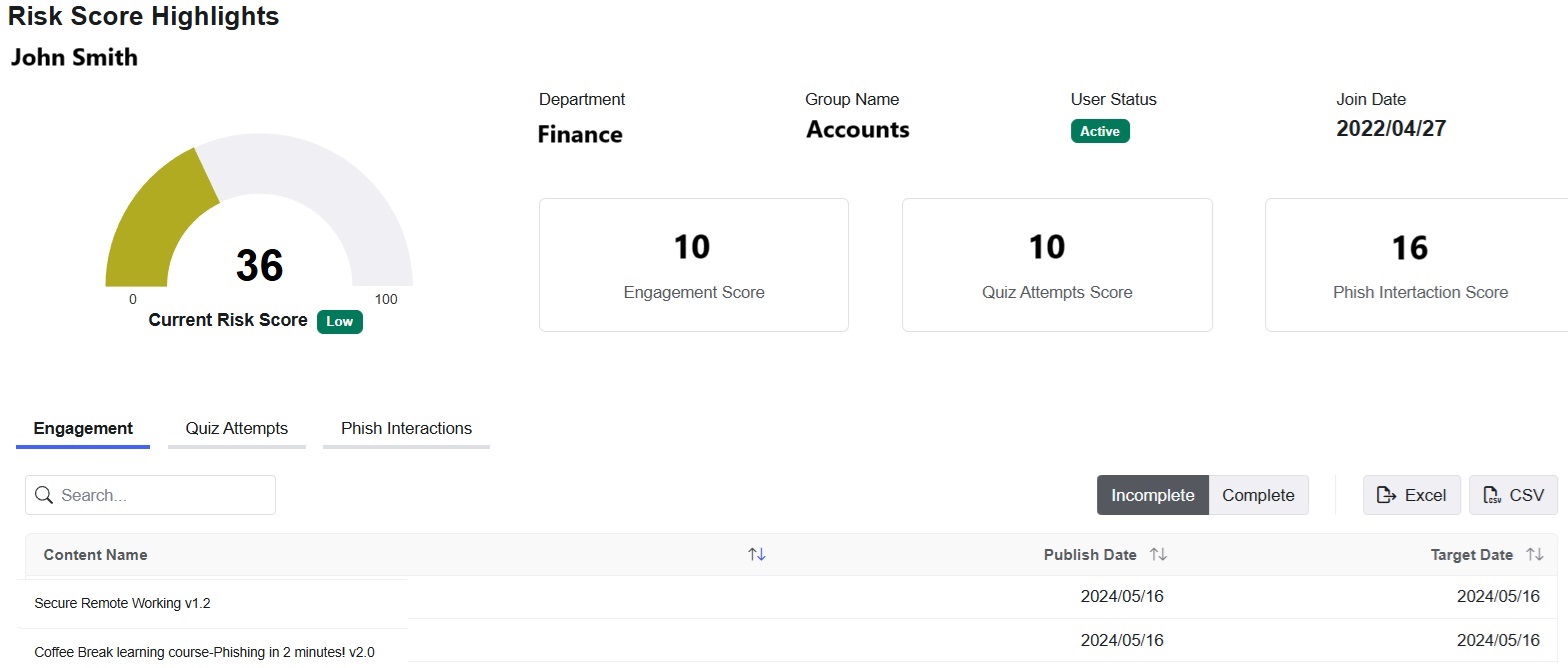
We’re excited to release Risk Score Insights, a new enhancement to the Employee Risk Score feature. This addition offers greater transparency into the user behaviour that is impacting their risk scores.
Key Features:
Administrator Updates
- Detailed Risk Insights: A new ‘View Insights’ button is accessible from the organisational and departmental risk charts for each user, providing admins with clarity on why risk scores are fluctuating.
- Addition of ‘Join Date’: Allows admins to easily identify why some users engagement levels could be low (such as new joiners).
End User Updates
- User Visibility: End users can now see what risk factors and content contribute to their score, with quick access to complete outstanding content to encourage them to reduce their score & increase engagement.
- Revisit Course Option: Users can see quizzes that they have performed poorly on and can revisit the course again to improve their knowledge in that area.
- Tips to Improve Scores: End users will be provided with information on how their scores are calculated along with top tips to help reduce their score.
This update enables admins to make informed decisions to help reduce risk and empowers employees to proactively manage their risk scores. Please see the following articles for more information: